Create video with Hailuo3 — Describe the scene. Direct the motion.
Turn a prompt or reference image into video, choose a compatible model, and keep every result in one focused creation workspace.
Try a video direction
VIDEO PROMPTS
See how a shot direction becomes a video
Explore prompt structures for action, camera movement, atmosphere, and pacing, then copy one into the generator.
A mud-covered off-road buggy plunges through a river crossing and throws a wall of water into the air. A pursuing truck bursts through the same spray a moment later. Dynamic embedded sports-documentary camera, physical motion, natural daylight, cinematic eight-second sequence.
Prompt direction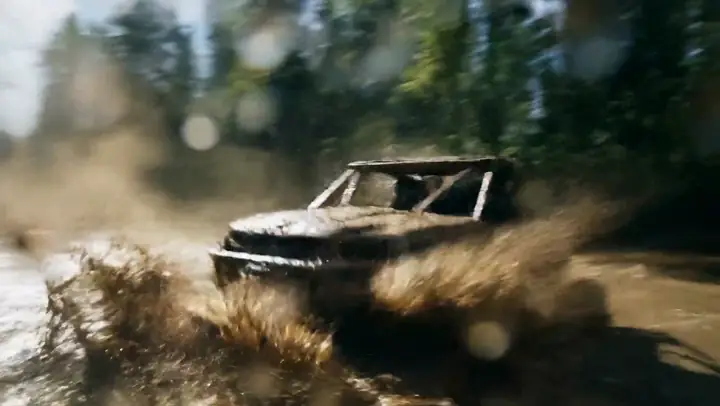 Video preview
Off-road river crossing
Fast documentary-style action with water, mud, and a pursuing vehicle.
Prompt
A mud-covered off-road buggy plunges through a river crossing and throws a wall of water into the air. A pursuing truck bursts through the same spray a moment later. Dynamic embedded sports-documentary camera, physical motion, natural daylight, cinematic eight-second sequence.
VIDEO DIRECTIONS
Start from motion, not a static gallery
Preview real local video examples first, reuse a prompt, and continue in the matching text-to-video workflow. Image tools remain available as a secondary path.
HAILUO3 WORKFLOWS
Two direct paths into video creation
Start from text when the whole shot is in your head, or upload an image when composition and subject are already defined. Image tools remain available for supporting work.


HOW IT WORKS
From shot direction to a finished video
Hailuo3 keeps task, model, inputs, parameters, credit cost, and history visible in one workflow.
01
Describe the shot or add an image
Write the subject, action, camera movement, and mood. Add a start image when you want to preserve an existing composition.
02
Choose a compatible video model
The model selector follows the active task and only exposes settings supported by that model.
03
Review cost, generate, and follow progress
Check the credit cost before submission, then follow the task in shared history and download the completed video.
Pricing
Create text-to-video and image-to-video projects with transparent credit costs. Start free; paid checkout is coming soon.
Save up to 40%
Starter
Create in Private - High-quality privacy generation
$11.90/mo
Billed $142.80/year. Auto-renews, cancel anytime.
Monthly
600 credits
Value
$10 = 504 credits
- ✓600 credits/month (~10 generations)
- ✓3 concurrent tasks
- ✓High resolution, no watermark
- ✓Private generation by default
- ✓Fast queue priority
Pro
Best valueMost Popular - Full commercial rights
$29.90/mo
Billed $358.80/year. Auto-renews, cancel anytime.
Monthly
2,400 credits
Value
$10 = 803 credits
- ✓2,400 credits/month (~40 generations)
- ✓5 concurrent tasks
- ✓High-resolution exports
- ✓Private generation
- ✓Ultra-fast queue priority
- ✓Full commercial license
- ✓Unlimited archive & folder management
Max
High-volume creation with priority support
$41.90/mo
Billed $502.80/year. Auto-renews, cancel anytime.
Monthly
6,000 credits
Value
$10 = 1,432 credits
- ✓6,000 credits/month (~100 generations)
- ✓8 concurrent tasks
- ✓Everything in Pro
- ✓API access & integrations
- ✓Advanced access controls
- ✓Priority technical support
- ✓White-label customization
- ✓Batch processing tools
- ✓Exclusive model access
FAQ
Questions before you generate video
The essentials about text-to-video, image-to-video, models, credits, and task history.
DIRECT THE NEXT SHOT
Turn the scene in your head into a moving shot.
Start from text or a reference image, choose a compatible video model, and keep the result in one workspace. Get 8 registration credits when the current offer is enabled.
Task-compatible video models Shared generation history No card required to start